The /proc directory is a special directory which holds all the details about the Linux system.
Because of this reason, it can be regarded as a control and information centre for the kernel.
The directory is a mount point for a pseudo-filesystem and it doesn’t contain real files but runtime system information. Most files within this directory are zero length.
The system information is not being constantly updated, it is obtained only when one wants to look at it.

Each of the numbered directories corresponds to an actual process ID.
Examination of some process files
/proc/cpuinfo
The file contains information about the CPUs on a computer.
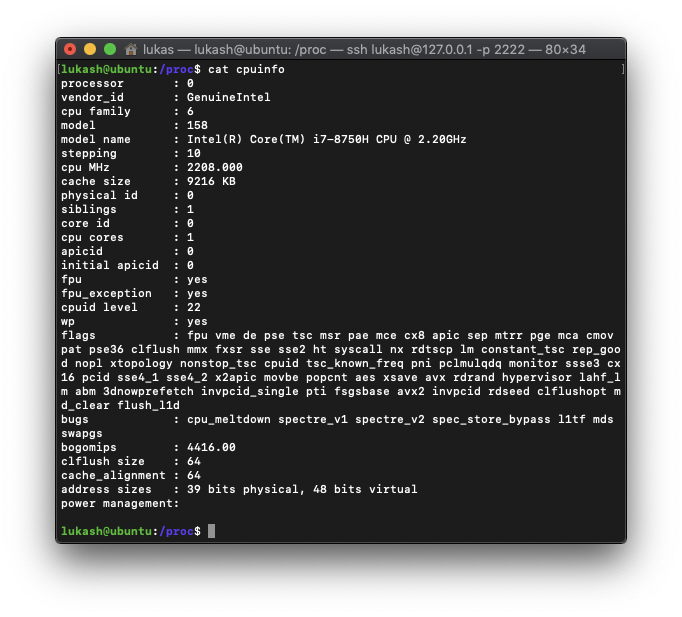
Description of some parameters:
| Parameter | Description |
|---|---|
| processor | value of which is zero for single-processor systems |
| vendor_id | value of which is GenuineIntel in the case of an Intel processor |
| cpu family | type of processor in the system |
| model name | common name of the processor, including its project name |
| cpu MHz | processor speed in millions of cycles per second |
| cache size | amount of high-speed cache memory built into the processor |
| fpu | value of which is yes if the processor contains a floating-point unit |
/proc/meminfo
The file contains information about the system’s RAM usage, both physical and swap. Much of the information in /proc/meminfo
is used by the free, top, and ps commands.

Note: While the file shows kilobytes (kB; 1 kB equals 1000 B), it is actually kibibytes (KiB; 1 KiB equals 1024 B).
This imprecision in /proc/meminfo is known but is not corrected due to legacy concerns.
Description of some parameters:
| Parameter | Description |
|---|---|
| MemTotal | total amount of usable RAM (physical RAM minus a number of reserved bits and the kernel binary code) |
| MemFree | amount of physical RAM left unused by the system |
| Buffers | amount of temporary storage for raw disk blocks |
| Cached | amount of physical RAM used as cache memory |
| SwapCached | amount of memory that has once been moved into swap, then back into the main memory, but still also remains in the swapfile. This saves I/O, because the memory does not need to be moved into swap again. |
/proc/mounts
This file provides a list of all mounts in use by the system:
1lukash@ubuntu:/proc$ cat mounts
2sysfs       /sys    sysfs       rw,nosuid,nodev,noexec,relatime 0 0
3proc        /proc   proc        rw,nosuid,nodev,noexec,relatime 0 0
4udev        /dev    devtmpfs    rw,nosuid,relatime,size=473408k,nr_inodes=118352,mode=755 0 0
5tmpfs       /run    tmpfs       rw,nosuid,noexec,relatime,size=100916k,mode=755 0 0
6/dev/sda2   /       ext4        rw,relatime,data=ordered 0 0
7...
Description of individual columns:
| Column | Description |
|---|---|
| 1st | mounted device |
| 2nd | mount point |
| 3rd | file system type |
| 4th | mounted read-only (ro) or read-write (rw) |
| 5th/6th | dummy values |
/proc/swaps
This file measures swap space and its utilization. It provides a snapshot of every swap file.
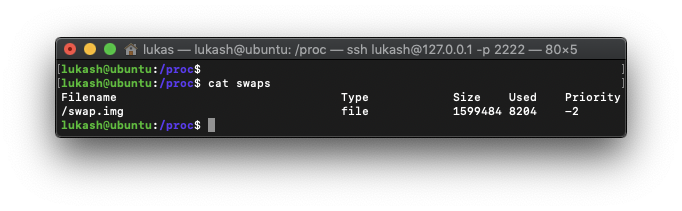
Description of individual columns:
| Column | Description |
|---|---|
| Filename | file name |
| Type | type of swap space |
| Size | total size |
| Used | amount of space in use (kB) |
| Priority | useful when multiple swap files are in use. The lower the priority, the more likely the swap file is to be used |
/proc/version
This file specifies the version of the Linux kernel, the version of gcc used to compile the kernel, and the time of kernel compilation. It also contains the kernel compiler’s user name.
1lukash@ubuntu:/proc$ cat version
2Linux version 4.15.0-65-generic (buildd@lgw01-amd64-006) (gcc version 7.4.0 (Ubuntu 7.4.0-1ubuntu1~18.04.1)) #74-Ubuntu SMP Tue Sep 17 17:06:04 UTC 2019
/proc/partitions
This file contains partition block allocation information.
1lukash@ubuntu:/proc$ cat partitions
2major minor  #blocks  name
3
4   7        0      91140 loop0
5   7        1      91264 loop1
6  11        0    1048575 sr0
7   8        0    8388608 sda
8   8        1       1024 sda1
9   8        2    8385536 sda2
Description of individual columns:
| Column | Description |
|---|---|
| major | major number of the device with this partition |
| minor | minor number of the device with this partition |
| #blocks | number of physical disk blocks contained in a particular partition |
| name | name of the partition |
/proc/interrupts
This file records the number of interrupts per IRQ on the x86 architecture
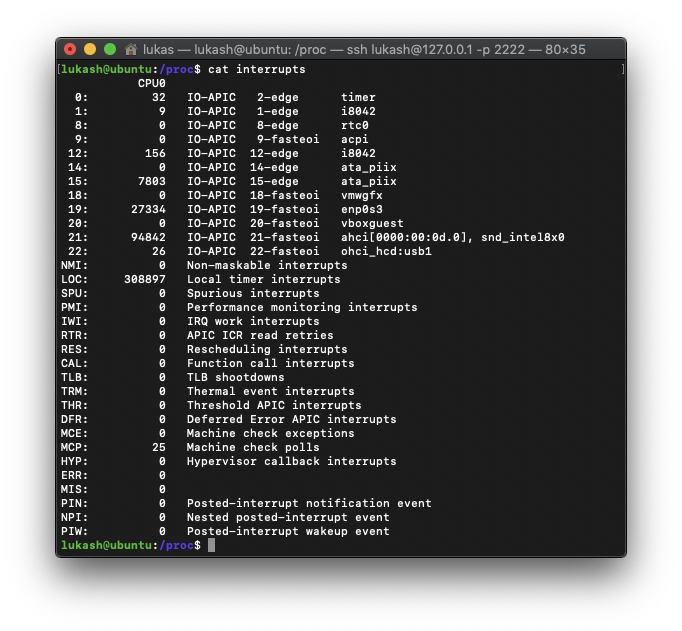
Description of individual columns:
| Column | Description |
|---|---|
| 1st | refers to the IRQ number |
| 2nd | number of interrupts per IRQ |
| 3rd | type of interrupt |
| 4rd | name of the device that is located at the IRQ |
Note: Each CPU in the system has its own column and its own number of interrupts per IRQ. The example above is for single-processor machine.
Examination of random process directory
Details of any process in the directory can be obtained by looking at the associated files in the directory for this process.
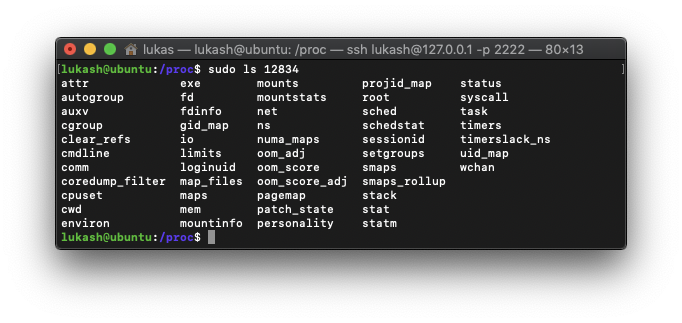
The purpose of some files in the folder:
| Column | Description |
|---|---|
| cmdline | command-line arguments |
| cpu | current and last cpu in which it was executed |
| cwd | link to the current working directory |
| environ | values of environment variables |
| mem | memory held by this process |
| status | process status in human-readable form |